

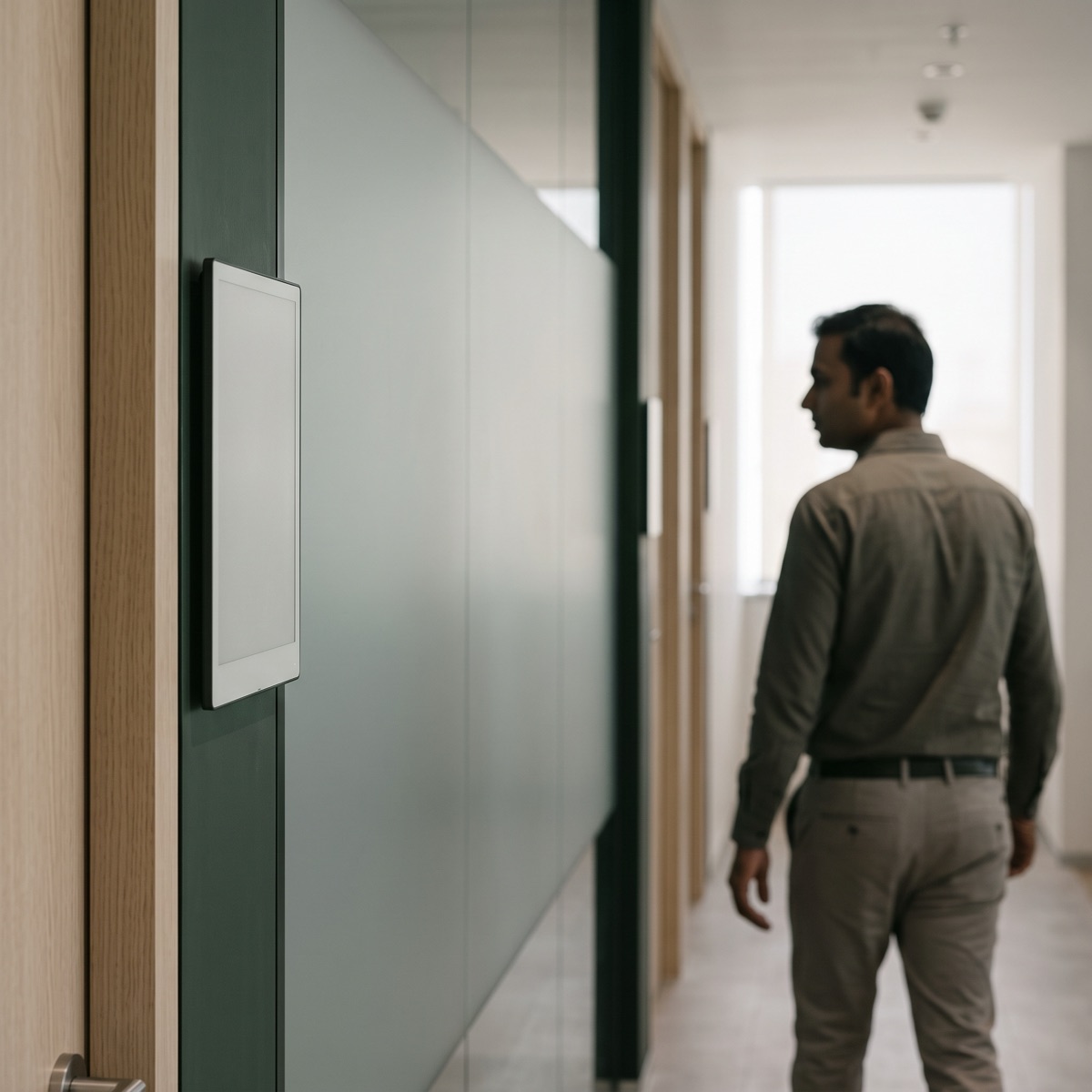
It might say AVAILABLE, or IN MEETING, or BOARD MEETING, 10:00 to 11:00 AM. If the primary job of the device is to communicate who is using the room, whether it is free and when it is booked next, an e-paper display is a fundamentally different approach. Instead of continuously powering a screen, e-paper updates the image when information changes and holds that image without continuous display power. That is the basic idea behind an e-paper meeting room scheduler.
This guide covers what the device is, how the four layers behind it fit together, the benefits and the cases where an LCD panel is the better tool, the questions buyers most often ask about Wi-Fi, power and calendars, and a list of ten questions to put to any vendor. Last verified: September 2026.
| Question | Answer |
|---|---|
| What is it? | A digital meeting room display |
| What does it show? | Availability and booking information |
| Does e-paper need continuous power? | No |
| Can it be battery-powered? | Yes |
| Does the panel need Wi-Fi? | Not necessarily |
| Can it integrate with calendars? | Yes, depending on the platform |
| E-paper or LCD? | Depends on what the panel has to do |
| Best suited for | Low-power information display |
What is an e-paper meeting room scheduler?
It is a digital display installed outside a meeting room that shows the room's booking status and schedule using e-paper technology. Depending on the system, it can show the room name, available or occupied status, the current meeting, start and end times, the next booking, the organiser, capacity and amenities, a QR code, company branding and booking instructions.
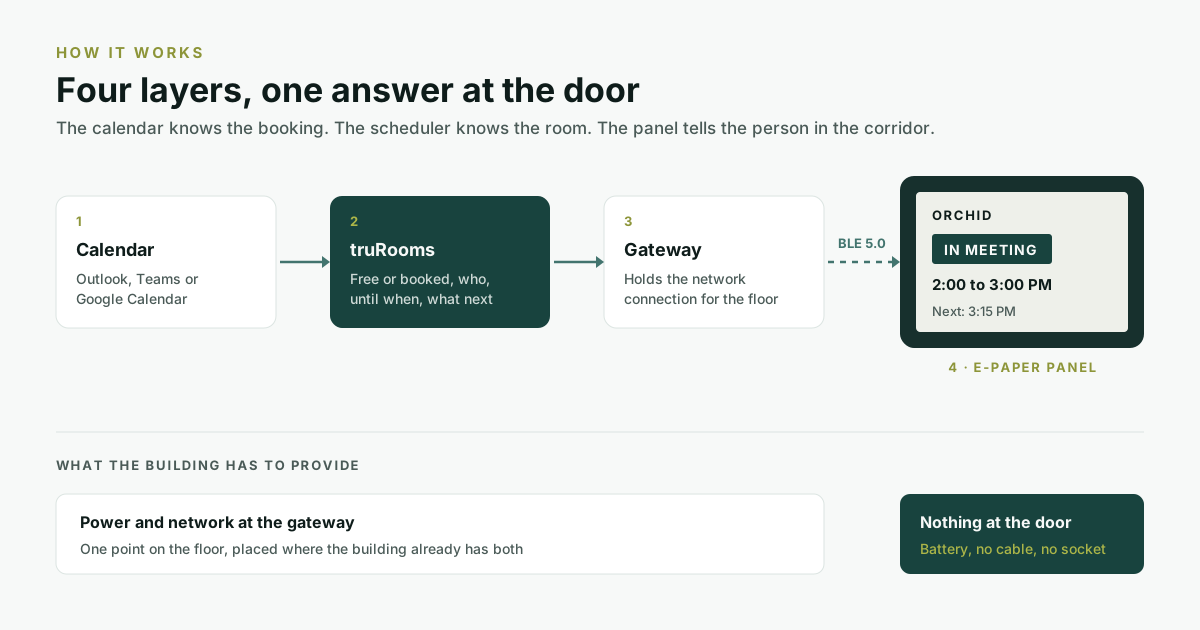
The display is connected to a meeting room scheduling platform, which receives booking information from the organisation's calendar or room management system. The physical display becomes the last visible layer of that system. The calendar knows the reservation. The scheduler knows the room. The display tells the person standing outside what is happening.
What is e-paper?
E-paper, or electronic paper display (EPD), is a display technology designed to reproduce some of the visual characteristics of printed paper. E Ink explains that its electronic paper uses charged particles inside tiny structures that move in response to an electric field to form the visible image. Its most important characteristic here is bistability: the display holds an image without consuming power to keep it on screen. Power is needed mainly when the image changes.
For a room scheduler that matters. The display might show "Room 402, Available" for twenty minutes without refreshing. Someone books the room, the system changes the image to "Booked, 10:30 to 11:30 AM", and the panel holds that without continuously powering the image. The physics is covered in more depth in why e-paper panels last years on a battery.
How does an e-paper meeting room scheduler work?
The complete system has four layers.
1. The calendar
This is where the meeting is created: Google Calendar, Microsoft Outlook and Microsoft 365, or another supported booking platform. Google Calendar, for example, supports organisational room resources that people add to events when they schedule a meeting.
2. The meeting room scheduling software
The scheduling platform connects the room's calendar to the physical room. It works out whether the room is free, who booked it, when the meeting starts and ends, whether another meeting follows, and whether the reservation has changed or been cancelled. This is the intelligence behind the display.
3. Wireless connectivity
In a truly wireless architecture the e-paper panel does not need its own Wi-Fi or Ethernet connection. ElhiTech's truRooms uses BLE 5.0 between the e-paper scheduler and a gateway, and the gateway handles the connection back to the scheduling system: calendar, then truRooms, then gateway, then BLE, then the panel. That is what lets the display run without a power or network cable at the door.
4. The e-paper display
The display receives the update and changes its image, for example from "ORCHID, AVAILABLE, Next: 2:30 PM" to "ORCHID, IN MEETING, 2:00 to 3:00 PM", and later to "NEXT MEETING, 3:15 PM". It acts as the room's real-time information layer.
Why use e-paper for a meeting room scheduler?
Most room displays do not need to play video, stream content, run animations, show presentations, host complex applications or refresh every second. Their job is to show room information clearly and reliably, and that is exactly the job e-paper is built for.
Seven benefits of e-paper meeting room schedulers
1. Very low power operation
Because e-paper holds an image without continuously powering the display, the device can be designed for very low-power operation. This is the biggest single difference from a conventional LCD.
2. Battery-powered operation
Low consumption makes battery-powered room displays practical. ElhiTech states 2 to 5 years of battery life for its truRooms e-paper schedulers, depending on deployment and usage. Battery life should always be evaluated against update frequency, display size, communication architecture, battery type, operating environment, temperature and usage pattern. A vendor's figure is a deployment specification, not a universal property of e-paper.
3. No power cable at the door
A conventional powered room panel needs power or PoE and a network run to the door. A wireless e-paper panel needs a BLE link to a gateway, and the truRooms e-paper scheduler is designed around no power or network cabling at the display. That matters when rooms are already built, walls are glass, the building is leased, there is no power point nearby, network drops are expensive, the deployment has to be fast, or rooms are reconfigured often. What that cabling actually costs is worked through in the cost of a meeting room door.
4. Paper-like readability
E-paper is reflective rather than backlit. E Ink describes its displays as reflecting ambient light in the way printed paper does, which suits information that has to be read at a glance. The aim is not to make the display look like a television. It is to make the information easy to see.
5. Clean, minimal aesthetics
Room schedulers sit at eye level beside doors, so they are part of the workplace's visual design. An e-paper display reads more like signage than a tablet on the wall, which matters in enterprise offices, hotels and coworking spaces.
6. Flexible installation
A wireless e-paper display can go where new infrastructure is hard to run: glass meeting room walls, existing floors, leased offices, coworking spaces, retrofitted buildings, temporary meeting spaces and large multi-room rollouts. Exact requirements depend on the wireless architecture and the site.
7. Lower infrastructure dependency
The biggest value is not necessarily the screen itself but what the technology removes: no network cable, no power cable, no PoE drop, no electrician at every door, and less installation work overall.
E-paper vs LCD meeting room schedulers
| Feature | E-paper | LCD |
|---|---|---|
| Continuous image power | Generally not required | Required |
| Battery operation | Well suited | Less suited |
| Touch interaction | Usually not the primary use | Common |
| Video | Not the right tool | Suitable |
| Animation | Limited | Suitable |
| Frequent screen changes | Less suited | Well suited |
| Paper-like appearance | Yes | No |
| Low-power applications | Strong fit | Less suitable |
| Rich interface | Limited | Strong |
| Wireless deployment potential | Strong | Depends on architecture |
Neither technology is better everywhere. Choose e-paper for simple, highly visible information at low power. Choose LCD when the room display needs to behave more like a touchscreen computer. The surface-by-surface version of that decision is in e-paper or LCD: which one belongs on which surface.
Do e-paper meeting room schedulers need Wi-Fi?
Not necessarily. It depends on the product's architecture. A panel can talk to a gateway over a local wireless protocol instead of joining Wi-Fi itself. The truRooms e-paper scheduler uses BLE 5.0 and a gateway, so the topology is network, then gateway, then BLE, then panel, rather than every individual room panel joining Wi-Fi. That distinction matters when planning a large deployment.
Does e-paper need electricity?
The display does not need continuous power to hold a static image. E Ink describes the technology as bistable: power is needed to change the image, not to maintain it. The complete device still needs energy to update the display, communicate wirelessly, process data and run any sensors, and that energy can come from a battery. That is why a complete e-paper scheduler can run for long periods without mains power.
Can e-paper schedulers work with Outlook and Google Calendar?
Yes, depending on the scheduling platform and its integrations. Google Calendar supports room resources for organisational meeting spaces. Microsoft Teams panels show the broader room scheduling model: dedicated displays showing room availability and meeting details from Outlook and Teams calendars. truRooms supports calendar-native workflows in Microsoft 365, Outlook, Microsoft Teams and Google Calendar through its add-ons and integrations, covered in booking a room without leaving your calendar.
The e-paper display is only the interface. The scheduling platform and the calendar integration are what make it intelligent.
Is an e-paper meeting room scheduler a touchscreen?
It does not have to be. Many e-paper room schedulers are designed for information display rather than tablet-style interaction: AVAILABLE, BOOKED, NEXT MEETING, ROOM 402. If the room needs extensive touch interaction, video, rich animation or a full room control interface, an LCD panel is the right specification for that room.
Can you book a meeting directly from an e-paper scheduler?
There are two approaches, and the right one depends on how people already book and on the hardware.
| Approach | What happens at the panel | Where booking happens |
|---|---|---|
| Display only | Shows current status, the current meeting and the next booking | Outlook, Google Calendar, Teams, a mobile app or a coworking platform |
| Local interaction | Some form of touch, QR booking, buttons or NFC | At the panel itself; Microsoft Teams panels, for example, are touchscreens that support on-the-spot reservations |
Who should consider an e-paper meeting room scheduler?
- Corporate offices: meeting rooms, boardrooms and collaboration spaces.
- Coworking spaces: where members need clear availability and operators want flexible deployment. The full coworking stack is in the best meeting room scheduling setup for a coworking space.
- Enterprises: where dozens or hundreds of rooms need consistent scheduling infrastructure.
- Campuses: where there are large numbers of meeting and collaboration rooms.
- Hotels and hospitality: meeting rooms, conference spaces and event areas.
- Healthcare: for suitable room and space identification and scheduling.
- Buildings undergoing retrofit: where running new power and network to every room is difficult.
When an LCD panel is the better choice
Some rooms want a different tool: video playback, high-refresh animation, rich interactive applications, continuous dynamic content, full tablet functionality, extensive touch controls, or video conferencing controls on the panel itself. Those are LCD jobs, and a well-specified estate often runs both.
If your room scheduler needs to behave like a computer, use a computer-like display. If it primarily needs to behave like smart signage, e-paper is worth considering.
Mayand Raj
What a wireless e-paper scheduler looks like in practice
| Time | What happens |
|---|---|
| 9:00 AM | The room is free. The panel reads ROOM 401, AVAILABLE. |
| 9:15 AM | An employee books the room in Outlook. The scheduling platform receives the booking and the gateway sends the update to the panel. |
| 9:15 AM | The panel changes to ROOM 401, IN MEETING, 9:15 to 10:00 AM. |
| 10:00 AM | The meeting ends and the panel returns to AVAILABLE. |
All of that happens without a power or network cable physically connected to the panel, when the architecture is designed for it.
ElhiTech truRooms: a wireless e-paper meeting room scheduler
truRooms is ElhiTech's integrated meeting room scheduling platform, with a truly wireless e-paper scheduler as one deployment option. The panel runs on battery over BLE 5.0, with no power or network cabling at the door, calendar synchronisation, customisable templates and three display sizes.
| Size | Resolution | Physical dimensions |
|---|---|---|
| 4.2 inch | 400 × 300 px | 85 × 64 mm |
| 7.3 inch | 800 × 480 px | 159 × 95 mm |
| 11.6 inch | 960 × 640 px | 245 × 163 mm |
ElhiTech states 2 to 5 years of battery life across the range, depending on deployment conditions, and the platform works inside Microsoft 365, Outlook, Microsoft Teams and Google Calendar.
What makes truRooms different
- Room scheduling: book and manage meeting rooms.
- Calendar integration: work inside the calendars teams already use.
- E-paper room visibility: show availability directly at the room.
- Navigator: a central view of room status for workplace and facilities teams.
- Utilisation analytics: see which rooms, capacities and features are actually used.
- Occupancy automation: ElhiTech's truIoT adds occupancy-driven automation such as ghost meeting release.
The system can grow from room booking, to room visibility, to room utilisation, to workplace automation.
How much does an e-paper meeting room scheduler cost?
There is no single industry-wide price. Total deployment cost depends on the number of rooms, display size, scheduling software, calendar integrations, gateways, installation, battery requirements, occupancy sensors, device management, support and the deployment model.
When comparing an e-paper scheduler with a conventional powered panel, do not compare only the screen price. Compare hardware, software, gateways, installation, power infrastructure, network infrastructure and maintenance: the total cost of ownership. In a large deployment, the infrastructure needed to put a powered display at every room can become a significant part of the project.
Ten questions to ask before buying an e-paper meeting room scheduler
- Does the display need a power cable?
- Does it need Ethernet or Wi-Fi?
- What wireless protocol does it use?
- How long does the battery actually last, and under what update frequency?
- How many displays can one gateway support?
- Which calendar platforms are supported?
- Can the display template be customised?
- Can administrators manage many rooms remotely?
- What happens if the network goes down?
- What is the total cost of ownership?
These are more useful than simply asking how much the panel costs.
E-paper schedulers vs traditional room signage
| Approach | Information | What it depends on |
|---|---|---|
| Traditional signage | Static | Someone changing it by hand |
| Digital LCD scheduler | Dynamic | Powered, usually networked hardware at the door |
| Wireless e-paper scheduler | Dynamic | A low-power display on battery, wireless communication and a central scheduling system |
The third approach combines the flexibility of digital information with the infrastructure characteristics that make printed signage attractive.
The future of meeting room scheduling
The next step is not simply a screen outside every room. It is connecting the calendar, the room, the display, occupancy, analytics and automation into a system that knows which rooms are available, which are actually occupied, which meetings have not started, which rooms are consistently underused, which sizes are most requested, when a meeting ends early, when a room can be released, and which room best fits a given meeting.
The room display is the visible part of that larger system.
The takeaway
An e-paper meeting room scheduler is not simply a screen made of e-paper. It is the combination of an e-paper display, wireless connectivity, scheduling software, calendar integration and room-level visibility, and that combination is a different approach to meeting room management.
If a room scheduler only needs to tell you whether a room is free, it should not need to behave like a television. For rooms that need rich interaction, video or a full touchscreen, LCD panels remain a strong option. For paper-like readability, low power, battery operation and minimal cabling, e-paper is an increasingly relevant technology, and truRooms pairs it with calendar-native scheduling, central room management and utilisation reporting. To see it working, book a 15-minute demo.
Frequently asked questions
What is an e-paper meeting room scheduler?
An e-paper meeting room scheduler is a digital display installed outside a meeting room that shows room availability, the current meeting and upcoming bookings using e-paper display technology. It is connected to a scheduling platform that reads bookings from the organisation's calendar.
How does an e-paper room scheduler work?
It receives booking information from a meeting room scheduling platform and updates the e-paper display. Depending on the architecture, the update travels through a gateway over a low-power wireless technology such as BLE. ElhiTech's truRooms e-paper scheduler uses BLE 5.0 to a gateway, which holds the network connection.
Does an e-paper meeting room scheduler need Wi-Fi?
Not necessarily. The panel can communicate with a gateway over another wireless protocol, so the gateway is the only device on the network. ElhiTech's truRooms e-paper scheduler uses BLE 5.0 and a gateway, and the panel itself needs neither Wi-Fi nor a network cable.
How long does an e-paper room scheduler battery last?
It depends on the device, how often the display updates, the communication architecture and operating conditions such as temperature. ElhiTech states 2 to 5 years for its truRooms e-paper scheduler range. E-paper uses power mainly when the image changes, not to hold it, which is what makes multi-year battery life practical.
Is e-paper better than LCD for meeting rooms?
They suit different jobs. E-paper suits low-power information displays at the door and can run on a battery with no cabling. LCD is the better choice when a room needs touch interaction, video, animation or a richer interface, and it needs continuous power and usually a network run to each door.
Can e-paper meeting room schedulers work with Microsoft Outlook and Google Calendar?
Yes, provided the scheduling platform supports the integration. ElhiTech's truRooms works with Microsoft 365, Outlook and Microsoft Teams through its calendar add-on, and with Google Calendar, so bookings made in those calendars appear on the e-paper panel at the room.
Can an e-paper room scheduler be used in coworking spaces?
Yes. Coworking spaces use room schedulers to show availability, upcoming bookings and room information at the door, with every display connected to a central booking system. Wireless e-paper panels are particularly useful where modifying a leased or existing space to run power and network to each door is difficult.