


The failure mode of workplace software is rarely that it does not work. It is that it works in a place nobody goes. A room booking portal that requires a browser tab, a separate login and a habit change loses to the path of least resistance, which is sending the invite and sorting the room out later, which is to say, never.
So the design question is not "what features should the booking tool have". It is "how do we get the booking to happen inside the thing they already have open".
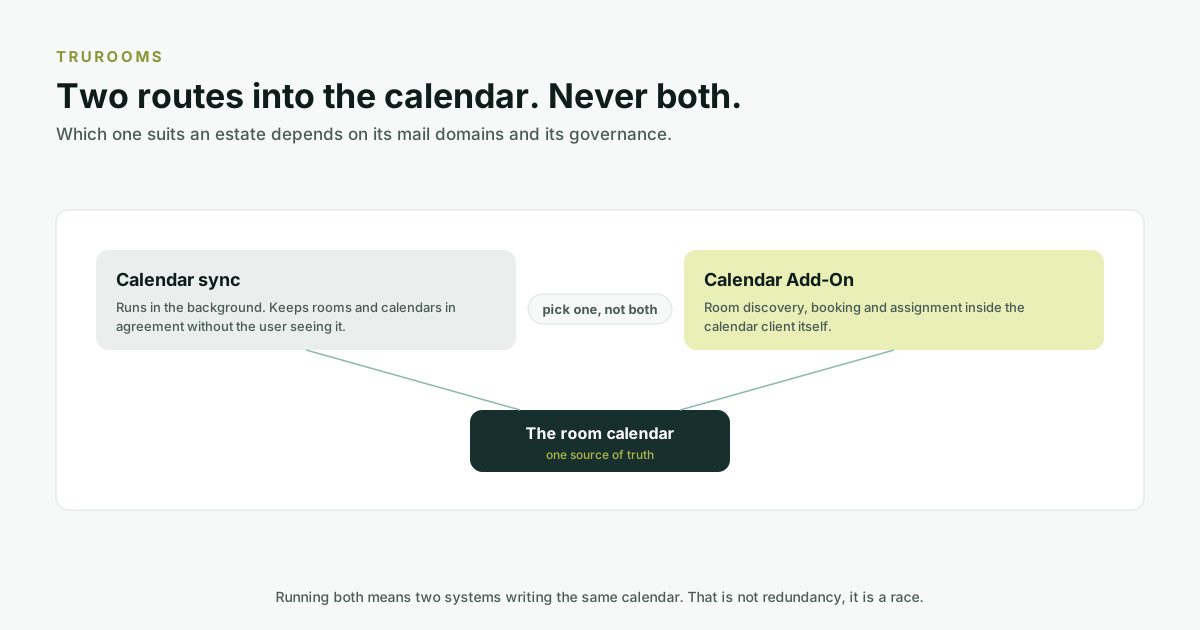
Two routes, and you pick one
truRooms offers two ways of reaching a calendar, and an organisation runs one or the other.
The calendar sync
Runs in the background, keeping rooms and calendars in agreement without the user seeing anything. Nobody installs anything. The room's availability is correct because the sync makes it correct, and people book rooms the way they always did.
The Calendar Add-On
Puts room discovery, booking and assignment inside the calendar client itself. The user is composing a meeting in Outlook, Teams or Google Calendar; the add-on is there in that window, showing which rooms are genuinely free, with the amenities and capacity they need.
What the add-on actually does
From inside the calendar, without opening anything else:
| Module | What it does |
|---|---|
| QuickBook | Finds and books a suitable room in three clicks. |
| Quick Assign | Assigns a room to a meeting that was created without one. |
| Check Availability | Shows whether a room is genuinely free before you commit to it. |
| Supercharged Invites | Enriches the invite itself with the room's details and joining information. |
Three is the constraint the flow was designed around, and the demonstration on our site stops counting there because that is where the booking ends.

Why this matters more in Indian enterprises than the feature list suggests
Two structural realities, both common here and both awkward for booking tools built elsewhere.
Multiple mail domains
Groups that grew by acquisition frequently run several mail domains and never consolidated the tenants. A booking tool that assumes one directory either cannot see half the rooms or double-books them. truRooms supports booking rooms across multiple mail domains, which is the difference between a system that works for the group and one that works for the largest subsidiary.
The reception desk is a real role
In a great many Indian offices, meetings are arranged by an executive assistant or a receptionist on somebody else's behalf, not by the attendee. Tools designed around self-service assume the person booking is the person attending. truRooms includes a reception portal built around the way that actually works here, and Quick Assign exists precisely because "a meeting already exists and now needs a room" is a real, frequent request rather than an edge case.
Where availability shows up
Booking inside the calendar solves the moment of commitment. It does not solve the moment of confusion. Somebody standing in a corridor wondering whether the room in front of them is free. That is what the panel at the door and the Navigator signage are for, and the same availability drives all three: the calendar, the panel, and the wayfinding screen. The hardware side of that is covered in where e-paper wins and where it does not.
What to ask a vendor
- Does booking happen inside Outlook, Teams and Google Calendar, or in a separate portal?
- If someone books a room the old way, directly on the room calendar, does your system notice?
- Can a receptionist book on someone else's behalf, and does the invite then look right to the attendee?
- How do you handle rooms in a different mail domain from the person booking?
- Do you run a background sync, an in-calendar add-on, or both, and if both, what stops them fighting?
Availability
The Calendar Add-On and the sync are both part of truRooms today. Which one your estate should run is genuinely a question rather than a preference, and it depends on your mail domains and governance. If you are on Exchange Online, it is also worth reading what happens to your meeting room booking in October 2026 before you commit to any vendor, ours included.
Frequently asked questions
Can I book a meeting room from inside Outlook or Teams?
Yes. The truRooms Calendar Add-On puts room discovery, booking and assignment inside Outlook, Teams and Google Calendar, so the booking happens in the window where the meeting is being composed rather than in a separate portal.
What is the difference between the calendar sync and the Calendar Add-On?
The sync runs in the background keeping rooms and calendars in agreement, with nothing for the user to install or learn. The add-on puts booking and room discovery inside the calendar client itself. An organisation runs one or the other, never both, because two systems writing the same room calendar will conflict.
Can a receptionist book a room on someone else's behalf?
Yes. Quick Assign attaches a room to a meeting that was created without one, and truRooms includes a reception portal designed around delegated booking, which is how a great many Indian offices actually schedule meetings.
Does it work across multiple email domains?
Yes. truRooms supports booking rooms across multiple mail domains, which matters for groups that grew by acquisition and never consolidated their tenants, a common shape in Indian enterprises and one that breaks tools assuming a single directory.
How many clicks does it take to book a room?
Three, using QuickBook. That is the design constraint rather than a marketing figure. The flow ends at three, which is why the demonstration on our site stops counting there.
What happens if someone books the room directly on its calendar instead?
That booking is still real and the room is genuinely occupied, which is why the availability shown on the door panel and the wayfinding signage is driven by the room calendar itself rather than by bookings made through any one route.