Hot-desking that is legible from the aisle
A hot-desk system nobody can see is a hot-desk system nobody trusts. Hotdesk Tags put the booking on the desk itself, fed by the software you already use, on hardware that needs nothing run to it.
It plugs into what you already run
Hotdesk Tags are a display layer, not another booking system. They read from the platform your team already books in, so nobody changes tools, migrates data or learns a second workflow.
Your fields, on the desk
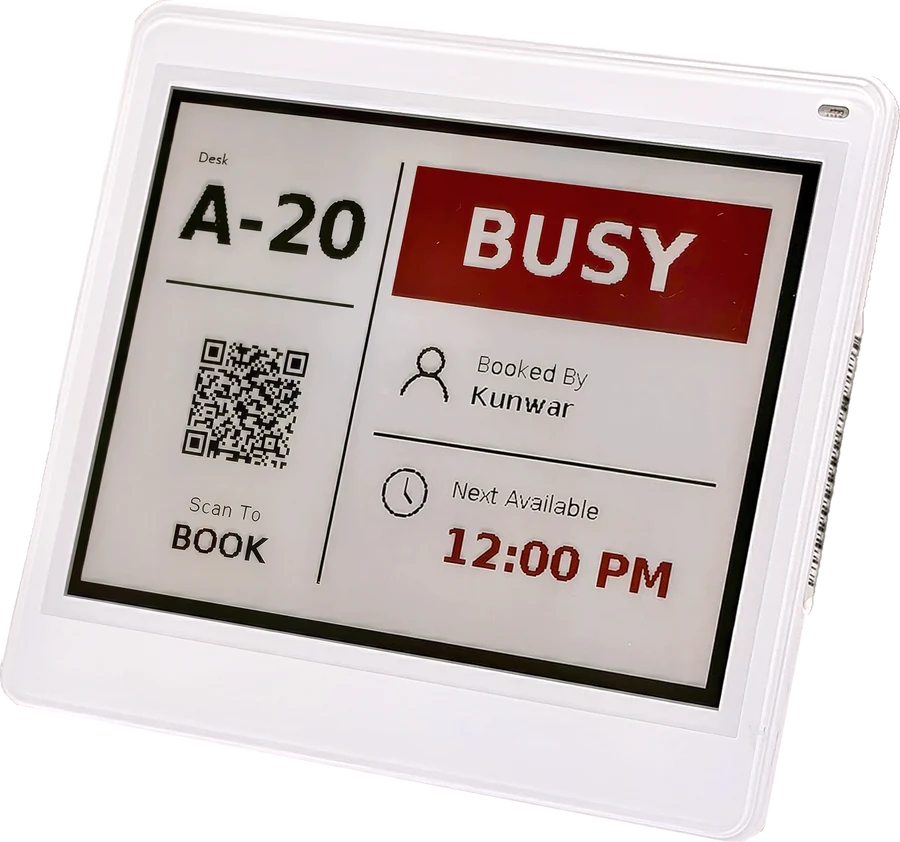
Desk name, occupant, team, booking window, equipment, accessibility, sanitisation status. Whatever your system holds can be mapped onto the tag and laid out how you want it.
Book the desk you are standing at
A QR on every tag opens your booking flow with that desk already selected, removing the floor-plan search from the most common action in hot-desking.
Deployable across a whole floor
Tags run on battery over BLE, so a floor of two hundred desks needs no cabling, no electrician and no downtime. One gateway covers 3000+ tags across roughly 300 sq. m.
Automation Hotdesk Tags run on your behalf
Capability by capability, the automation that runs without administrative intervention.
Book the desk you are standing at
The commonest action in hot-desking is claiming a free desk you can see. Scanning the tag opens your own booking flow with that desk already selected, which beats hunting for it on a floor plan in an app you have not opened yet.
Somebody walks in without a booking. Scanning the tag opens your own booking flow with that desk already selected, so the commonest action in hot-desking stops being a hunt through a floor plan.
Your fields, on your desks
Hotdesk Tags do not want to be your booking system. They read from the platform your team already books in, and whatever that platform knows about a desk can be mapped onto the tag and laid out the way you want it.
Hotdesk Tags are a display layer, not a second booking system. Whatever your platform already knows about a desk can be mapped onto the tag and laid out the way you want it.
Hotdesking Tag Specifications
No power at the desk, no network drop, and no maintenance for years.
Both sizes, drawn at true relative size with the diagonal marked.
Every part of Hotdesk Tags
Expand any module for the technical detail.
- Status legible at a glance from the end of the aisle
- Occupant name and booking window where policy allows it
- Updates as bookings change, without anyone touching the desk