

If your meeting rooms are booked through Exchange Online, there is a good chance something in that chain still speaks Exchange Web Services. EWS is the API that room booking systems, panel vendors and calendar integrations have leaned on for over a decade. Microsoft is switching it off.
The headline date is 1 October 2026. That is not the date EWS stops working entirely, that comes later, but it is the date the default flips, and for most organisations the default is what decides the outcome. This post covers what actually changes, the two Graph parity gaps that specifically affect room booking, and how to find out in an afternoon whether you are exposed.
The dates that actually matter
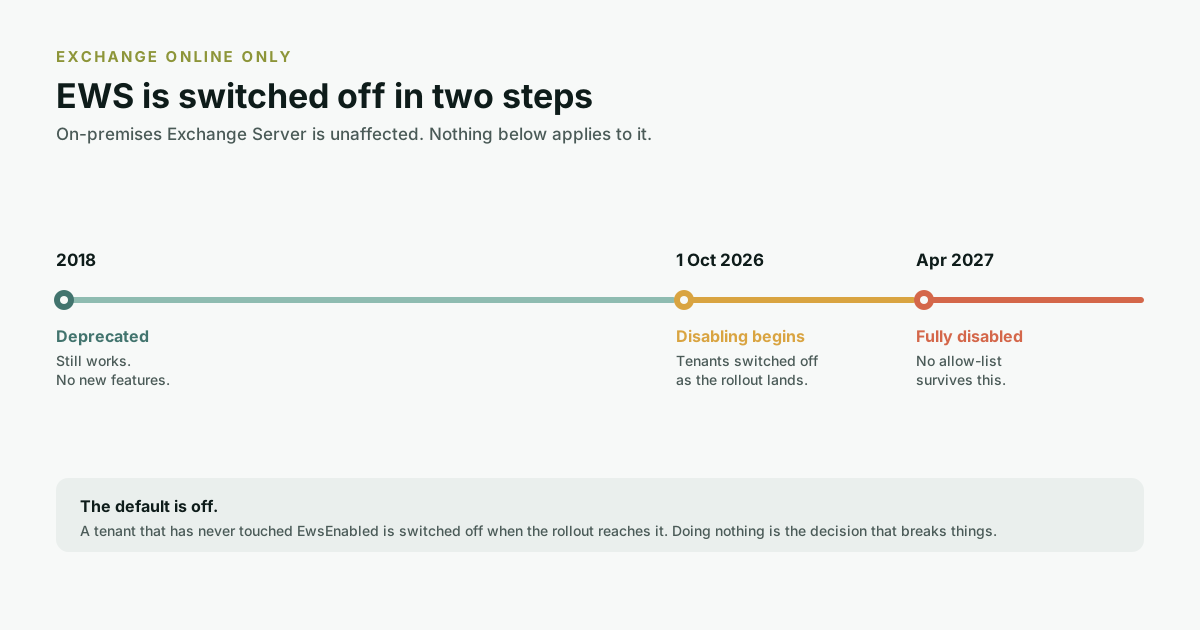
Microsoft's published timeline runs from a 2018 deprecation notice to full shutdown in 2027. Only the last two rows change anything operationally:
| When | What happens |
|---|---|
| July 2018 | EWS deprecated. No further functionality updates. It keeps working, but stops gaining features. |
| 2023 | Disablement date formally set to October 2026. |
| January 2024 | The Midnight Blizzard incident involves EWS. Microsoft widens the scope from third-party apps to include its own, and states the urgency increased. |
| 2025 | Admins gain the ability to disable EWS manually at organisation and user level. EWS Usage Reports and the EWS Analyzer tool ship. |
| 1 October 2026 | EWS starts being disabled globally for all organisations. Tenants that have not explicitly opted in are switched off as the rollout reaches them. |
| April 2027 | EWS is fully disabled. No opt-out. |
Why this lands hardest on meeting rooms
Most EWS migration advice is written for mail archiving and backup tools. Room booking is a harder case, for reasons that are specific to how rooms work:
- Rooms are resource mailboxes, not users. A booking system does not act as a person; it reads and writes calendars it does not own, usually through an application identity. That is the exact access pattern the retirement is tightening.
- The failure is silent and physical. When a mail archiver loses API access, an admin gets an alert. When a room booking integration loses access, the panel outside the room keeps displaying its last known state. It shows a room as free that is booked, or booked that is free, and nobody files a ticket because the screen looks fine.
- Rooms are the most visible surface you own. A sync failure in a back-office integration is an IT problem. A sync failure at the door is something every person walking past the room sees, several times a day.
- The integration is often not yours. The panel is from one vendor, the booking layer from another, and the EWS dependency may be buried in either. Your own EWS usage report will show the app, but not necessarily which supplier owns it.
The two Graph gaps that specifically affect room booking
Microsoft's position is that Graph now has near-complete parity with EWS. That is broadly true, and Microsoft publishes the remaining gaps openly. Two of them sit directly in the path of a meeting room system, and neither gets much attention because they do not affect mail tools at all.
1. Event delta for recurring events
Microsoft lists event delta for recurring events as an open parity gap. Delta queries are how an integration asks "what changed since I last looked" without re-reading every calendar. The difference between a sync that scales to a thousand rooms and one that does not.
Recurring meetings are where room booking gets genuinely hard, and it is worth being precise about why. A weekly series is stored as one master item plus a set of exceptions: the week somebody moved it an hour later, the week it was cancelled, the week the room changed. Reading the series tells you the pattern. It does not tell you about the exceptions. Reading every occurrence tells you the truth but does not scale. Delta closes that gap, and for recurring events it is not there yet.
In practice this means a system that leaned on EWS delta for recurrence has to re-implement that logic against a different set of primitives, rather than swap one call for another. It is a rewrite, not a find-and-replace, which is why "we'll migrate to Graph" is a longer sentence than it sounds.
2. Creating an event without inviting attendees
This one is stated flatly in Microsoft's roadmap: creating a calendar event without inviting attendees will not be supported in the Graph API. Not a gap to be closed later. A capability that is not coming.
That pattern is common in room booking. A walk-up booking made at the panel, a reception-desk booking on someone's behalf, a block placed on a room for cleaning or maintenance. These often write an event directly onto the room's calendar with no attendee list, because there is nobody to invite. Any integration built that way needs a different approach, not a different endpoint.
On-premises Exchange Server is not affected
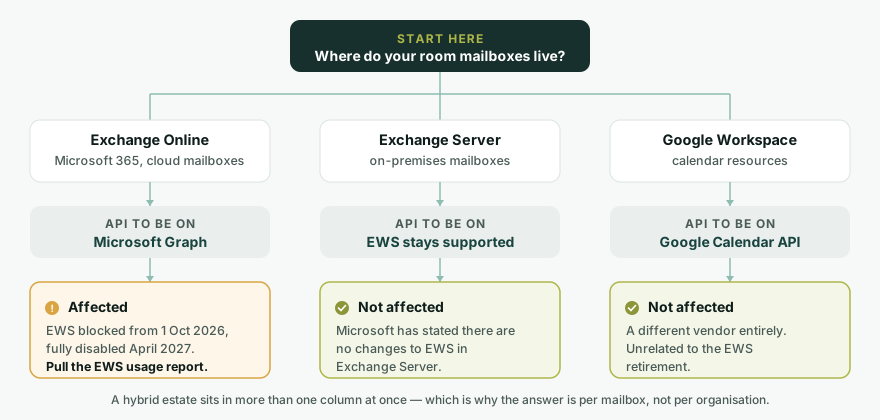
This distinction gets lost constantly, so it is worth stating plainly: the retirement applies to Exchange Online and Microsoft 365 only. Microsoft has said there are no changes to EWS in Exchange Server. If your mailboxes are on-premises, EWS keeps working and nothing here is urgent for you.
That matters more in India than the coverage suggests. Plenty of government bodies, banks, defence-adjacent manufacturers and hospitals here run Exchange on-premises deliberately, for data-residency or procurement reasons rather than because they have not got round to migrating. For those estates, EWS is not legacy. It is the supported API, and it stays that way.
It also means "does your product use EWS?" is the wrong question to ask a vendor. The right one is: which API do you use for which deployment? A booking system serving both cloud and on-premises customers should be on Graph for Exchange Online and EWS for Exchange Server. One codebase, two paths, chosen by where the mailbox lives.
How to find out whether you are exposed
This is a half-day exercise, and it is worth doing before you call anyone. In order:
- Pull the EWS Usage Report. It is in the Microsoft 365 admin centre under usage reports, and it lists the applications hitting EWS in your tenant. This is the ground truth. Everything after this step is interpreting it.
- Identify which entries are your room booking chain. Panel vendor, booking platform, any middleware, and anything an integrator set up and left. The report gives you app identities; matching those to suppliers is the part that takes the time.
- Check your current tenant setting.
Get-OrganizationConfigshows whetherEwsEnabledhas been set. If it has never been touched it will be null, which is the state that gets switched off when the rollout arrives. - Get a date in writing from every supplier in that chain. "We are aware and working on it" leaves you without a plan. "Our Graph implementation ships in version X, available from date Y" lets you schedule around it.
- Decide whether you need the allow-list as a bridge. If a critical app will not be migrated in time,
Set-OrganizationConfig -EwsEnabled $true -EwsAllowedAppIDs "aaaaaaaa-bbbb-cccc-dddd-eeeeeeeeeeee"keeps EWS open for the named Entra application IDs and blocks everything else. SettingEwsAllowedAppIDsto$nullremoves the restriction. - Diarise April 2027. The allow-list is a bridge, not a destination. EWS is fully disabled then, and no allow-list survives it.
What to ask a room booking vendor
Five questions. The answers tell you more than a datasheet will.
- Which API do you use for Exchange Online today. EWS, Graph, or both? If both, what still runs on EWS?
- If we are on-premises, which API do you use there, and does that change your cloud answer?
- How do walk-up and reception-desk bookings write to the room calendar, given Graph will not support creating an event without attendees?
- How do you handle changes to a single occurrence of a recurring series, given event delta for recurring events is still an open Graph gap?
- What is your published date for full Graph support, and what happens to our panels if it slips?
Where truRooms sits
Our own answers to those five questions:
truRooms talks to Microsoft 365 over the Microsoft Graph API, authenticating through the Microsoft identity platform. The EWS path in the codebase serves on-premises Exchange Server, which the retirement does not affect. Google Workspace is a separate integration against the Google Calendar API. Rooms in different mail domains can be booked from one place, which is a common shape in Indian groups that have grown by acquisition and never consolidated their tenants.
truRooms runs in the cloud or fully on-premises, and the on-premises build is a genuine deployment target rather than a hosted product with a private network in front of it, which is why the Exchange Server path exists at all.
The short version
If your rooms are booked through Exchange Online, pull the EWS usage report this week. If your rooms are booked through Exchange Server on-premises, this does not apply to you and you can stop reading. If you are not sure which of those is true, that is itself the finding, and it is the first thing to fix.
The panels will not tell you when this breaks. That is the whole problem with them: a screen showing yesterday's answer looks exactly like a screen showing today's.
Frequently asked questions
When exactly does EWS stop working in Exchange Online?
Microsoft starts disabling EWS globally on 1 October 2026, and fully disables it in April 2027. Between those dates an organisation can keep specific applications working using an allow-list of Entra application IDs, but after April 2027 there is no opt-out.
Does the EWS retirement affect on-premises Exchange Server?
No. Microsoft has stated the retirement applies to Microsoft 365 and Exchange Online only, and that there are no changes to EWS in Exchange Server. On-premises estates are unaffected.
What replaces EWS for meeting room booking?
Microsoft Graph. It has near-complete parity for most scenarios, but two published gaps affect room booking specifically: event delta for recurring events is still open, and creating a calendar event without inviting attendees will not be supported at all.
How do I find out which applications in my tenant use EWS?
Use the EWS Usage Reports in the Microsoft 365 admin centre, which list the applications making EWS requests in your tenant. Microsoft also publishes an EWS Analyzer tool for inspecting application code.
Can I keep EWS enabled past October 2026?
Temporarily. Setting EwsEnabled to true along with an EwsAllowedAppIDs allow-list of specific Entra application IDs keeps EWS available to those applications and blocks the rest. This only buys time until April 2027, when EWS is fully disabled.
Will my room panels show an error when this happens?
Usually not, and that is the risk. A panel that loses its calendar connection typically keeps displaying the last state it successfully fetched, so a room can show as free while it is booked. Treat a panel that has stopped changing as a failure signal rather than a quiet day.
Sources
- Deprecation of Exchange Web Services in Exchange Online, Microsoft Learn
- Retirement of Exchange Web Services in Exchange Online, Microsoft 365 Developer Blog
- Migrate Exchange Web Services apps to Microsoft Graph, Microsoft Learn
- Set-OrganizationConfig reference (EwsEnabled, EwsAllowedAppIDs), Microsoft Learn