

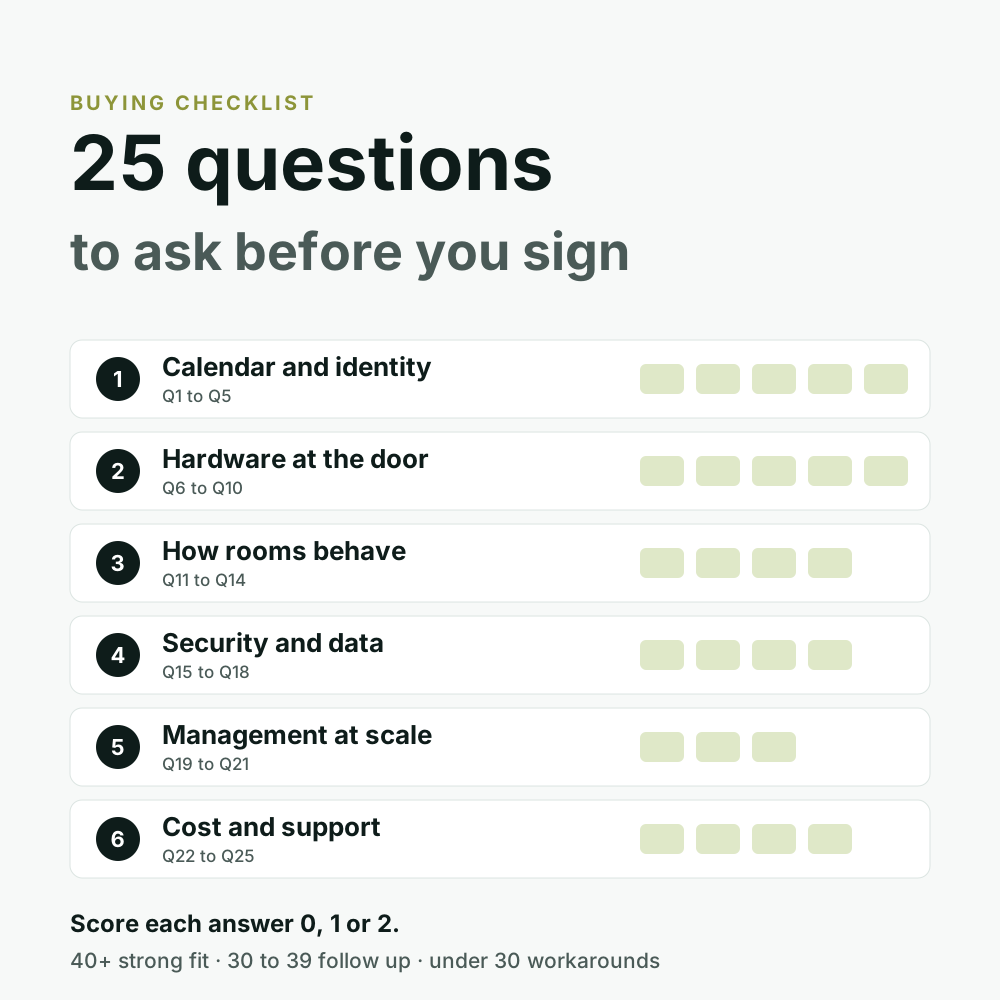
Use it three ways: as an RFP template, as a script for demos, or as a scoring sheet to compare proposals side by side. Every question comes with what a good answer sounds like. Last verified: October 2026.
What you are actually buying
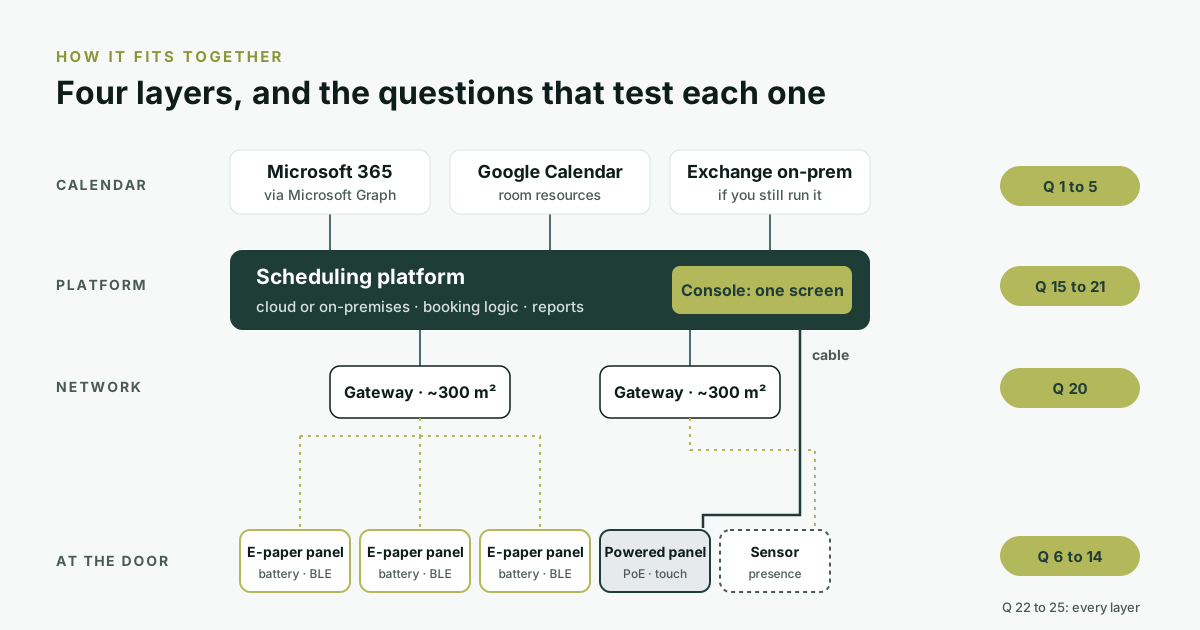
A meeting room scheduler is not one product. It is four layers that all have to work together: the calendar people book in, the platform that holds the booking logic, the network that carries updates across the floor, and the panel at the door. Each group of questions below tests one of them, and the cost and support questions test all four at once.
The checklist at a glance
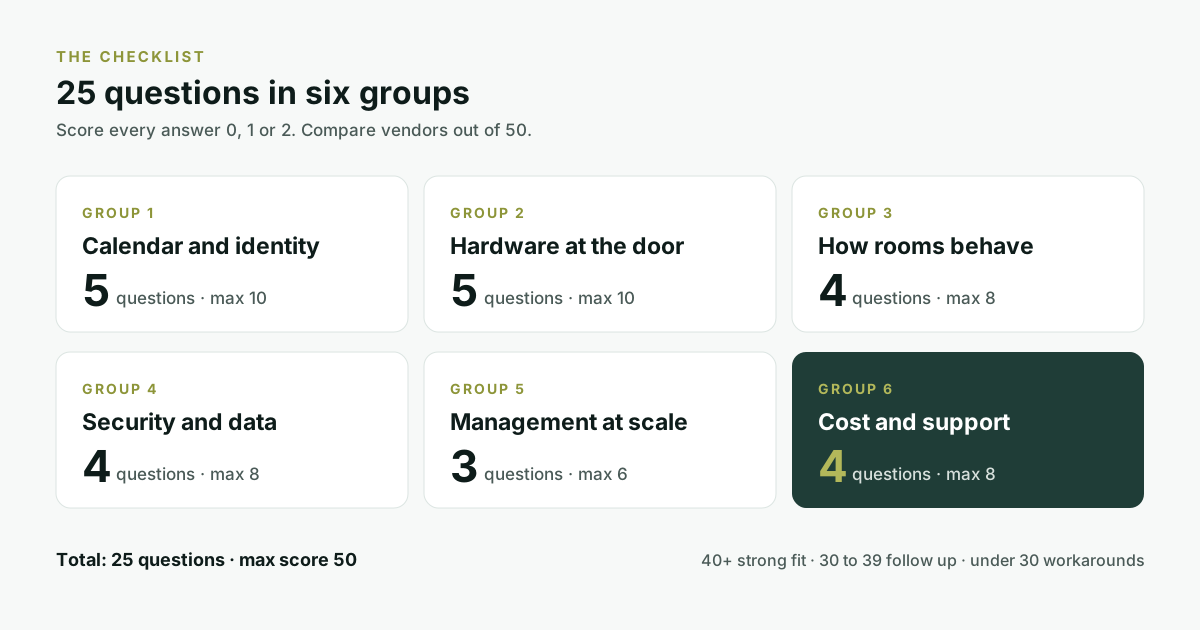
| Group | Questions | Max score | What it saves you from |
|---|---|---|---|
| 1. Calendar and identity | Q1 to Q5 | 10 | A system nobody uses, or one that breaks when Microsoft changes an API |
| 2. Hardware at the door | Q6 to Q10 | 10 | Cabling, electricians and downtime that were never in the quote |
| 3. How rooms behave | Q11 to Q14 | 8 | Rooms that look booked but sit empty |
| 4. Security and data | Q15 to Q18 | 8 | A stalled IT or legal review |
| 5. Management at scale | Q19 to Q21 | 6 | Walking to every door to change a setting |
| 6. Cost and support | Q22 to Q25 | 8 | A cheap panel with an expensive total |
How to use this checklist
- Send it before the demo. Ask for written answers. The demo should prove the answers, not replace them.
- Score each answer 0, 1 or 2. 0 = no or unclear. 1 = partly, or with a workaround. 2 = yes, shown or documented.
- Weight what matters to you. Leased office? Weight hardware higher. Bank or government body? Weight security higher.
- Ask for proof. A screenshot, a document or a reference customer beats a yes on a slide.
From shortlist to rollout in six steps
The checklist does its work in steps 2 and 3, before anyone sits through a demo.
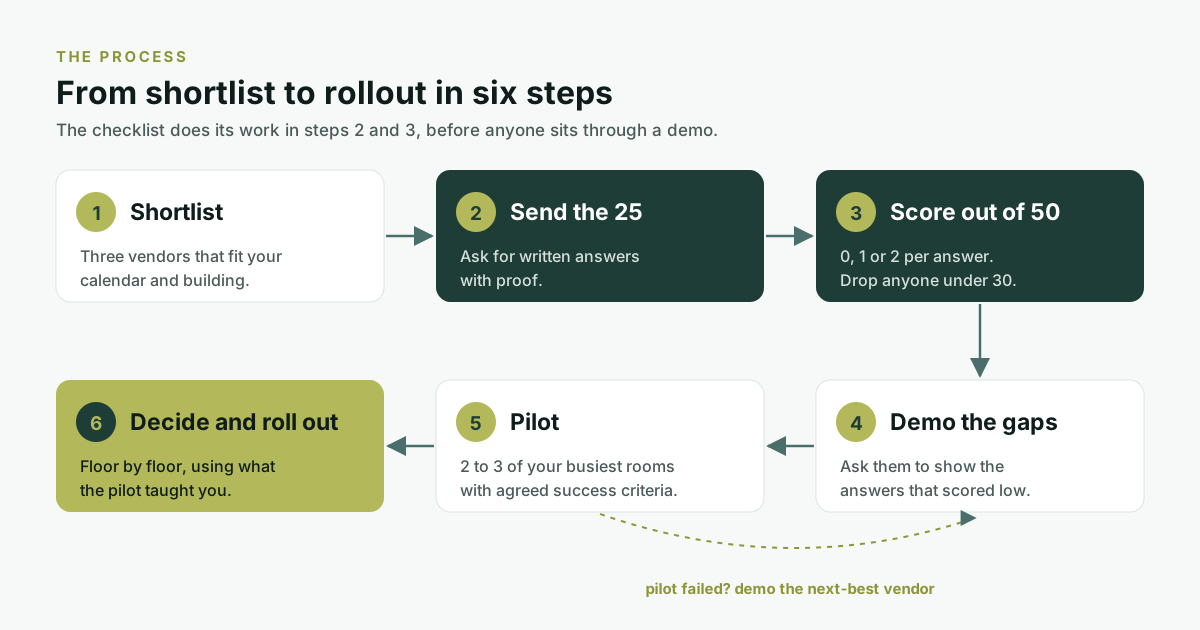
- Shortlist. Three vendors that fit your calendar and building.
- Send the 25. Ask for written answers with proof.
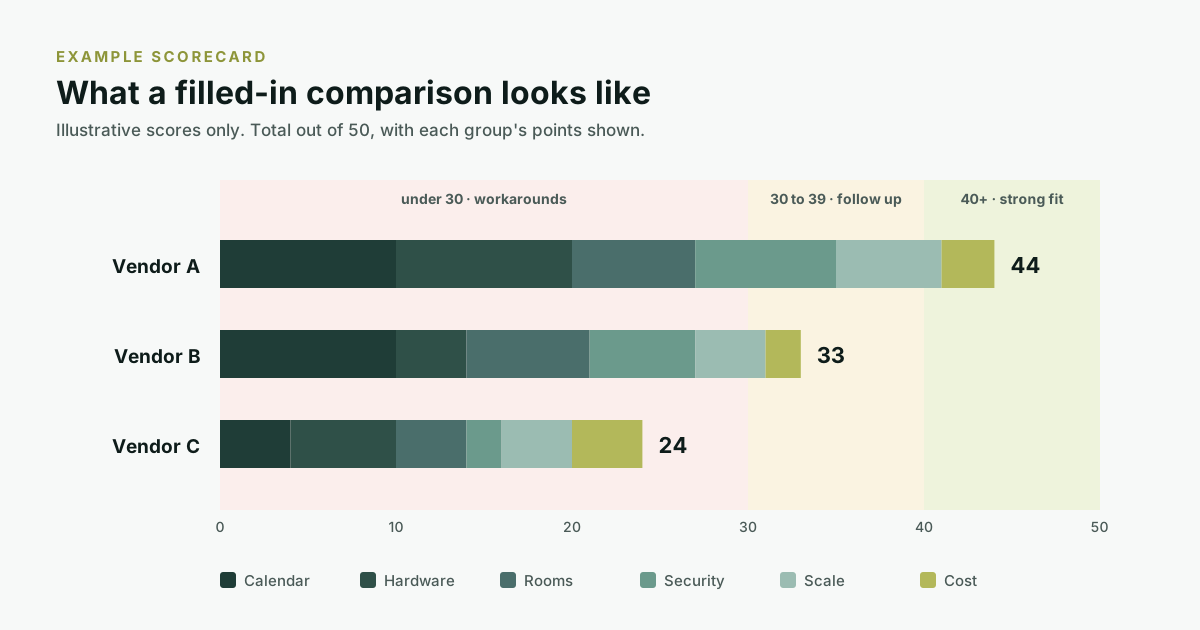
- Score out of 50. 0, 1 or 2 per answer. Drop anyone under 30.
- Demo the gaps. Ask them to show the answers that scored low.
- Pilot. Two or three of your busiest rooms, with agreed success criteria. If the pilot fails, demo the next-best vendor.
- Decide and roll out. Floor by floor, using what the pilot taught you.
Group 1: Calendar and identity (Q1 to Q5)
If booking does not happen where people already work, they will not use it. This group decides adoption.
- Q1. Which calendars do you support natively? A good answer: Microsoft 365 and Google Workspace, plus on-premises Exchange if you still run it.
- Q2. For Microsoft 365, do you use Microsoft Graph or Exchange Web Services? Microsoft started switching off EWS in Exchange Online in October 2026 and will turn it off completely in April 2027. A good answer: Graph today, with a date for any EWS that is left. More in what EWS retirement means for room booking.
- Q3. Can people book from inside Outlook, Teams and Google Calendar? A good answer: yes, through an add-in. No extra app or portal to learn.
- Q4. Do changes sync both ways? If someone moves or cancels the invite, does the room follow? A good answer: yes, every time.
- Q5. Can you book rooms across several email domains? Group companies often run separate tenants. A good answer: yes, from one place, without guest-account workarounds.
Group 2: Hardware at the door (Q6 to Q10)
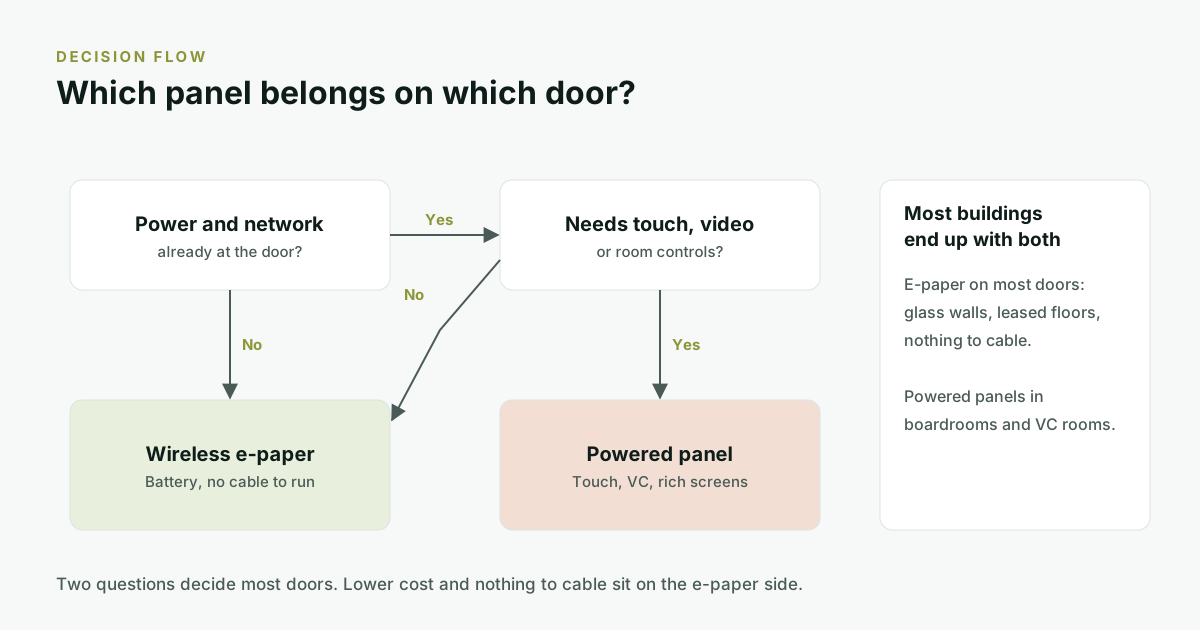
This is where quotes and reality drift apart. The panel price is rarely the full cost of putting a screen on a door.
- Q6. What does each panel need at the door: power, network, both or neither? A good answer: a clear list. Powered panels usually need PoE or mains plus Wi-Fi. Wireless e-paper panels can need neither.
- Q7. If it runs on a battery, how long does it last, and at what update rate? A good answer: a range with the assumptions stated, not one best-case number.
- Q8. Which display types and sizes do you offer? A good answer: options for small rooms and boardrooms, and honest advice on where e-paper or LCD fits better. See e-paper or LCD.
- Q9. How does it mount on glass, plaster or partitions? A good answer: no drilling into glass, and nothing to agree with the landlord.
- Q10. What does the panel show if the network or gateway goes down? A good answer: the last status stays readable, and the system recovers on its own.
Group 3: How rooms behave (Q11 to Q14)
A good scheduler makes rooms easier to find and harder to waste.
- Q11. How are no-shows released: check-in, presence sensing or both? Check-in needs a device at the room and people who remember to tap it. Microsoft's own check-in for Teams panels is off by default. A good answer: you choose per room. More in occupancy sensing and ghost meetings.
- Q12. Can people grab a free room on the spot? A good answer: yes, from the calendar in a few taps, or at the panel where the hardware allows.
- Q13. Does the room finder show photos, capacity and equipment? A good answer: yes, so people choose rooms by what is in them, not by name.
- Q14. Is there a live floor view for the facilities desk? A good answer: every room's status on one screen, with a read-only mode that is safe for a lobby display.
Group 4: Security and data (Q15 to Q18)
Bring IT and legal in early. These are the four questions they will ask anyway.
- Q15. Can it run in the cloud and on-premises? A good answer: both, with a clear list of what leaves your network in each case.
- Q16. Where is data stored, and how does it fit India's DPDP Act? The DPDP Rules, 2025 were notified on 14 November 2025, with an 18-month window to comply. A good answer: data location, how long it is kept, and a DPDP position in writing.
- Q17. Which certifications do you hold today, and which are in progress? A good answer: the audit report or certificate, not a logo. An honest "in progress" beats an implied certification.
- Q18. What can a passer-by see on the panel? Meeting titles and organiser names can be sensitive. A good answer: you choose the fields, including a status-only mode.
Group 5: Management at scale (Q19 to Q21)
Ten rooms are easy. Two hundred rooms across four sites are not, unless everything is managed from one place.
- Q19. Can every panel be set up, updated and restarted remotely? A good answer: from one console, with no site visit per device.
- Q20. How many devices does one gateway cover, and over what area? A good answer: a real number and floor area, so you can count gateways before you buy.
- Q21. Does it handle many sites and tenants from one console? A good answer: yes, with roles so each site manages its own rooms.
Group 6: Cost and support (Q22 to Q25)
Two quotes with the same panel price can differ hugely once cabling, installation and gateways are added. Compare the whole system.
- Q22. What is the total cost per room over five years? Include hardware, licences, gateways, cabling, installation, electricity, batteries and support. A good answer: an itemised five-year view, not a panel price. We worked one through in what a screen on a meeting room door actually costs.
- Q23. How is it licensed: per room, per user or per device? A good answer: one clear unit, and what happens to the price when you add a floor.
- Q24. Who supports you, where and how fast? A good answer: named support channels and response times in writing.
- Q25. Can we pilot on real rooms first? A good answer: yes, on two or three of your busiest rooms, with success criteria agreed upfront.
Where the money goes
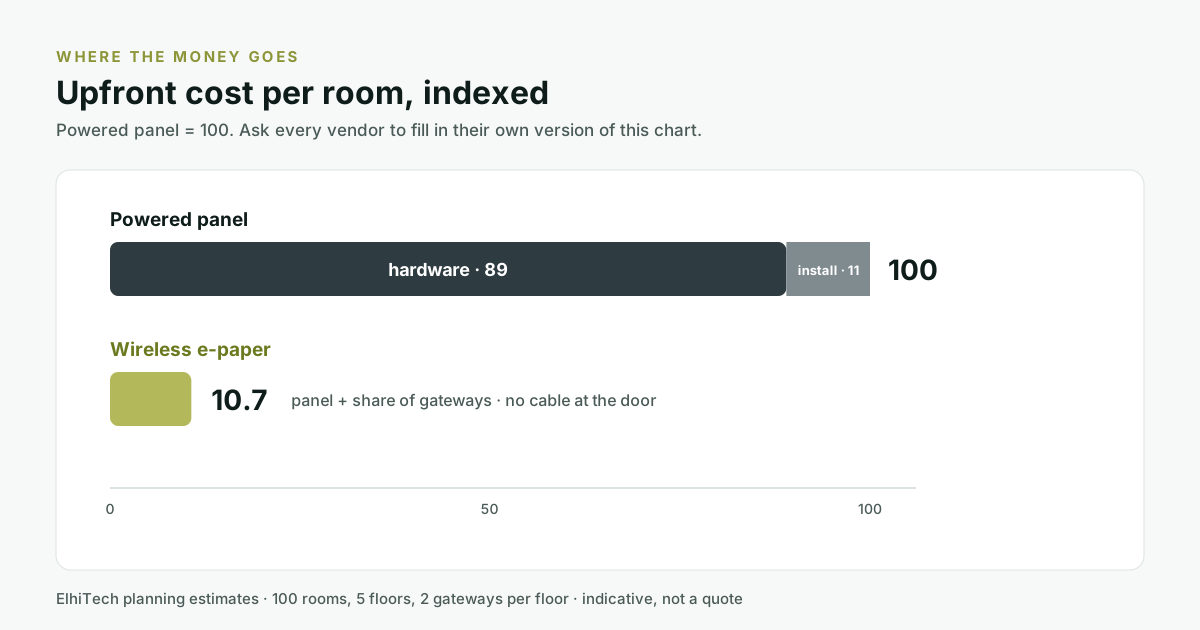
| Panel type | Hardware | Installation | Index |
|---|---|---|---|
| Powered panel | 89 | 11 | 100 |
| Wireless e-paper | 10.7 (panel plus share of gateways) | None at the door | 10.7 |
Most of the gap is the hardware itself. Ask every vendor to fill in their own version of this table, with the same breakdown.
Red flags to watch for
- "It works with Outlook" but no mention of Microsoft Graph, or no date for moving off EWS.
- A panel price with no installation line. Cabling and power usually hide there.
- Battery life with no update rate. "Up to 5 years" means little without the assumptions.
- Certification logos with no report behind them. Ask for the document.
- Booking only in the vendor's own app. Adoption will suffer.
- No pilot. A confident vendor lets you test on your own rooms.
A simple scoring sheet
| Group | Max | Vendor A | Vendor B | Vendor C |
|---|---|---|---|---|
| Calendar and identity | 10 | |||
| Hardware at the door | 10 | |||
| How rooms behave | 8 | |||
| Security and data | 8 | |||
| Management at scale | 6 | |||
| Cost and support | 8 | |||
| Total | 50 |
- 40 or more: strong fit. Move to a pilot.
- 30 to 39: ask follow-up questions on the low groups.
- Under 30: expect workarounds you will live with for years.
How truRooms answers the checklist
We wrote this checklist for buyers, but it is only fair to show our own answers. Here is how truRooms, ElhiTech's meeting room scheduling platform with its wireless e-paper scheduler, measures up.
| Group | truRooms |
|---|---|
| Calendar and identity | Microsoft 365 over Microsoft Graph, Google Calendar, and on-premises Exchange. Booking inside Outlook, Teams and Google Calendar. Multi-domain booking across separate mail domains. |
| Hardware at the door | Wireless e-paper scheduler on battery over BLE 5.0: no power or network cable at the door, 2 to 5 years per battery depending on use, in 4.2, 7.3 and 11.6 inch sizes. Powered panels also supported where a room needs touch. |
| How rooms behave | QuickBook, Quick Assign and a room finder with photos and equipment. truOccupancy releases ghost meetings by presence. Navigator gives a live floor view with a read-only mode. |
| Security and data | Cloud or on-premises on your own VM. DPDP compliant today; SOC 2 and ISO 27001 are in progress. |
| Management at scale | One console, ELM, to set up and update every device remotely. One gateway covers 1,000+ tags across roughly 300 sq. m, and can run as a soft gateway on your own VM. |
| Cost and support | A free demo with a solution architect who sizes gateways and installation with you, and support through support@elhi.tech. |
The best scheduler is not the one with the best demo. It is the one that still works the day Microsoft changes an API and the day you add a floor.
Mayand Raj
The takeaway
- A scheduler is four things at once: a calendar link, hardware on every door, a security review and a support contract.
- Ask about all four before you sign. Send the 25 questions to every shortlisted vendor.
- Score the written answers, then pilot the winner on your busiest rooms.
Want to see how truRooms answers them live? Book a 15-minute walkthrough with a solution architect and bring the checklist. We will answer every question on your calendar and your floor plan.
Frequently asked questions
What should I look for in a meeting room scheduler?
Native integration with your calendar, what each panel needs at the door, how no-shows are released, where data is stored, how devices are managed at scale, and the total cost over five years including installation and support.
What questions should be in a meeting room booking system RFP?
Group them under calendar and identity, hardware at the door, how rooms behave, security and data, management at scale, and cost and support. Ask for written answers with proof, and score each one 0 to 2 so vendors can be compared.
Does a meeting room scheduler need to support Microsoft Graph?
For Microsoft 365, yes. Microsoft began switching off Exchange Web Services in Exchange Online in October 2026 and will turn it off completely in April 2027, so integrations should use Microsoft Graph. On-premises Exchange Server is not affected by this change.
Do meeting room panels need power and network cabling?
Powered LCD panels usually need PoE or mains plus Wi-Fi at every door. Wireless e-paper panels can run on a battery and talk to a gateway on the floor, so they need no cable at the door.
How do I compare the cost of meeting room schedulers?
Compare the total cost per room over five years: hardware, licences, gateways, cabling, installation, electricity, batteries and support. A low panel price can hide high installation and infrastructure costs.
How does the DPDP Act affect meeting room booking systems?
Room booking systems handle names, emails and meeting details, which is personal data. The DPDP Rules, 2025 were notified in November 2025 with an 18-month window to comply, so ask vendors where data is stored, how long it is kept and what they show on public displays.
Should we run a pilot before buying a room scheduler?
Yes. Pilot two or three of your busiest rooms for a few weeks with agreed success criteria, such as adoption, booking accuracy and no-show release, before rolling out across floors.