

Every LCD in your building is redrawing its image dozens of times a second, all day, whether anyone is looking at it or not. It has to. Switch off the power and the picture is gone instantly, because the picture only ever existed as a continuous act of maintenance.
E-paper does not work that way, and the difference is not a matter of efficiency. It is a different answer to the question of what an image is.
The image is a physical arrangement, not a signal
An electrophoretic display is a layer of microcapsules. E Ink, whose displays dominate the category, describes the mechanism plainly: each microcapsule holds negatively charged white particles and positively charged black particles suspended in a clear fluid, and when an electric field is applied the corresponding particles move to the top of the capsule where they become visible.
The important word is move. The particles physically travel to the surface and stay there. When the field is removed they do not drift back. There is nothing pulling them anywhere. The image is now a arrangement of solids, held in place by the viscosity of the fluid around them, in exactly the way ink is held on paper.
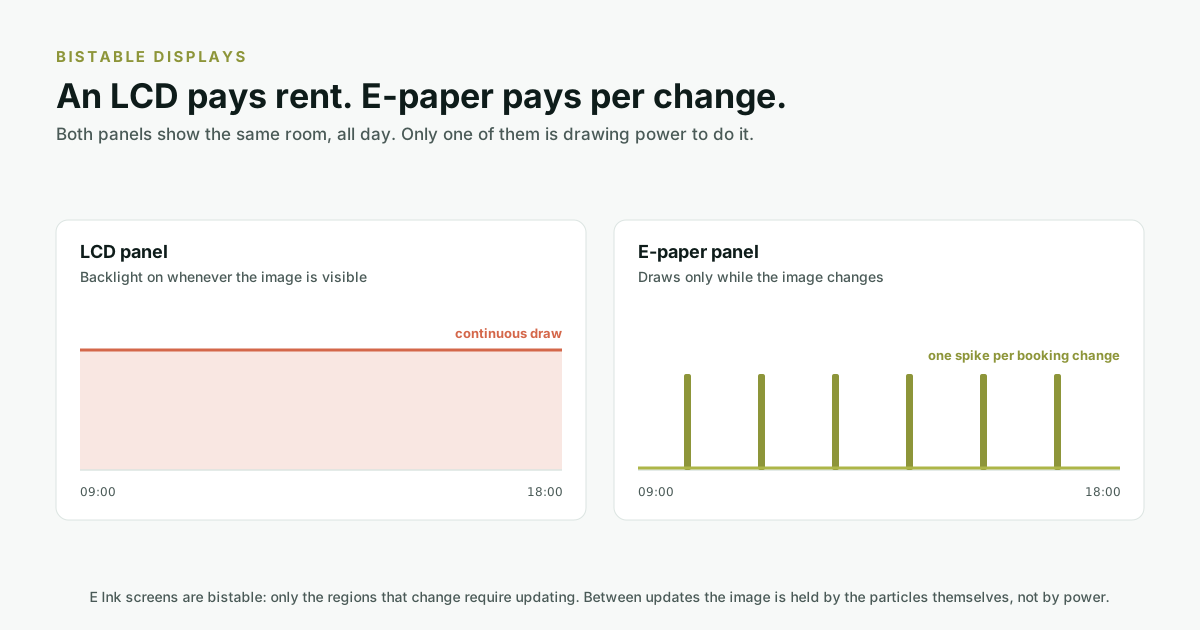
This property is called bistability, and E Ink states its consequence directly: because the screens are bi-stable, only the regions of the screen that are changing require updating. A panel showing "Olive. Free until 14:00" is drawing nothing to show it. It draws only at 14:00, when something has to change.
So where does the power actually go?
If holding the image is free, a panel that never changed would run more or less forever. Real panels do change, and they do other things besides. The budget breaks down roughly like this:
| Activity | Cost | Notes |
|---|---|---|
| Holding the current image | None | The particles stay put on their own. |
| Redrawing the screen | The dominant cost | Every booking change, cancellation and day rollover. |
| Listening for updates | Small but constant | The radio wakes on a schedule rather than staying on. |
| Receiving an update | Small | Short BLE exchange, then back to sleep. |
| Cold or hot conditions | Varies | Both battery chemistry and particle movement are temperature-sensitive. |
This is why the honest answer to "how long does the battery last" is a range and not a number. truink panels are specified at two to five years in normal usage, and where a given panel lands inside that range is mostly a function of how often its image changes.
What actually drains a panel
Three things, in rough order of impact.
1. Refresh count
A meeting room door in a busy coworking floor might change fifteen times a day. A ward bed label might change twice. Those two panels have very different lifespans and the same battery. If you want to estimate before you buy, count the changes rather than the hours.
2. How often it checks in
A panel that polls for updates every thirty seconds spends more than one that polls every five minutes, and for a room that is booked a day ahead the faster poll buys almost nothing. This is a configuration decision with a direct battery consequence, and it is worth asking a vendor what theirs defaults to.
3. Temperature
Particle movement slows in cold and battery capacity falls. In an air-conditioned Indian office this is a non-issue; in an unconditioned warehouse corridor or an outdoor-adjacent gatehouse it is worth raising before deployment rather than after.
What this buys you at the door
The battery is not the point. The point is what the absence of a cable makes possible:
- A panel can go where an electrician cannot. Glass partitions, listed buildings, fit-outs that are already finished, doors where the nearest socket is on the other side of a corridor.
- Install is not a project. No power run, no network drop, no containment, no making good afterwards, which is the majority of the cost of putting a screen on a door. That arithmetic is worked through in what a screen on a meeting room door actually costs.
- Moving a room is a five-minute job. Coworking floors get reconfigured constantly. Unscrewing a panel and remounting it two metres away is not a change request.
- It fails quietly and slowly. A battery gives you months of warning, unlike a tripped circuit that takes a floor of panels dark at once.
The trade you are making
E-paper is not a replacement for an LCD. It is built for a different job, and the split is worth knowing before you specify either. It refreshes in about a second with a visible flash, it does not do video, and its colour is a palette rather than a full gamut. A lobby video wall should be an LCD, and we would specify one. The full comparison, including the rows where LCD wins, is in where e-paper wins and where it does not.
Before you buy, ask these
- What is the specified battery life, and at how many refreshes per day? A figure without a refresh assumption is not a figure.
- How often does the panel poll for updates by default, and is that configurable per site?
- What is the operating temperature range, and what happens outside it?
- How does the panel report its own battery level, and where does that appear? You want a dashboard warning, not a dead panel.
- Is the battery user-replaceable, and by whom. Facilities, or an engineer visit?
Where truink sits
truink panels run on battery and communicate over BLE 5.0, with no power or network cabling at the door. They come in 4.2", 7.3" and 11.6" in portrait or landscape, with colour options including BWRY and up to six-colour displays. Specified battery life is two to five years under normal usage. They are managed from the same dashboard as the rest of the tru ecosystem, which matters more than it sounds: a battery warning is only useful if it appears somewhere a facilities team already looks.
Frequently asked questions
Does an e-paper display really use no power when the image is not changing?
Effectively none for the display itself. E Ink states that its screens are bi-stable and only the regions that change require updating, so the image is held by the physical position of the particles rather than by continuous power. The panel still uses a small amount of energy to wake and check for updates.
How long does an e-paper room panel battery last?
truink panels are specified at two to five years under normal usage. The range is wide because the dominant cost is the number of screen refreshes, so a busy meeting room door that changes fifteen times a day will sit at a very different point in that range from a label that changes twice.
What makes e-paper battery life shorter in practice?
Three things, in order: how often the image changes, how frequently the panel polls for updates, and temperature. Cold slows particle movement and reduces battery capacity, which matters in unconditioned spaces but not in a typical air-conditioned office.
Can e-paper show video or full colour?
No to video, and colour is limited to the panel's palette rather than the full range an LCD offers. A refresh takes roughly a second and carries a visible flash. If a surface needs motion or photographic colour, an LCD is the correct choice.
Is e-paper readable in bright light?
Yes, and this is one of its genuine advantages. Because it reflects ambient light rather than emitting its own, it stays legible in the bright, glare-heavy corridors where an LCD washes out. The same reason paper is readable outdoors.
What happens when the battery runs out?
The panel stops updating, and because e-paper is bistable it keeps displaying the last image it successfully drew. That is why battery reporting to a dashboard matters: a stale panel looks identical to a working one, so the warning has to arrive somewhere a person is looking.