
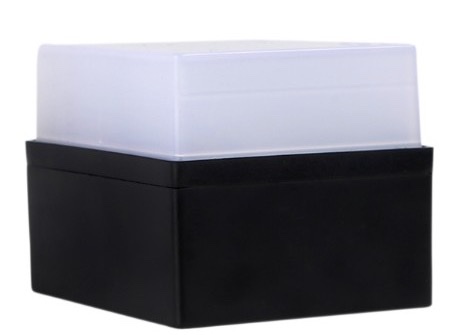
Meet Cubie, your glowing desk pet.
A little cube with a big personality. It glows red when you’re busy and green when you’re free, so nobody taps your shoulder mid-call again. And when your AI agent needs you, Cubie lets you know.
On Amazon India · Mac and Windows · Checks whether your camera is on, never what it sees
A day with Cubie
It glows the colour of your day.
Magenta on a call, blinking red when the camera’s on, orange while your AI works, green when you’re free. Nobody has to ask “are you busy?” again. Try it.
Glowing greenFree
Try it: click the dot in the menu bar, join the standup and start your video, or open Claude Code.
What Cubie does
Small cube. Big personality.
Knows when you’re on a call
Magenta the moment a call starts, blinking red when your camera comes on, in Zoom, Teams, Meet, Slack, Webex or any other app. It notices that you’re on a call, never what anyone sees or says.
AI sessions
Claude CodecubieNeeds you
elhiwebsiteWorking
firmwareDone
18.4M tokens today
Your AI’s little sidekick
Start a long task in your coding agent and walk away. Orange while it works, blinking orange when it needs you, blinking green when it’s done. Every session, every project.
Focus mode
Settle into steady work and Cubie quietly shows Focus. It only checks which app is in front, never what you type, and ends when you drift off.
Busy for 30 minutes
One tap for Busy, Free, 30 minutes or an hour, with a countdown. Cubie checks in after a call, so you never stay busy by accident.
Camera on
Call on
AI needs you
Free
Office hours · 9:00 to 18:00
Your colours, your rules
Pick a colour for every state, dim it for the evening, and set office hours so Cubie switches off when you do.
Your week, in colour
See your call hours, focus hours and longest streak, then share a card of your week on LinkedIn or X.
Works with the AI tools you already use
- Claude Code
- Codex
- Cursor
- Gemini CLI
- GitHub Copilot CLI
- Windsurf
- Kiro
- Cline
- Aider
- Amp
- opencode
- Qwen Code
- Factory Droid
- Augment
- Continue


'%3e%3c/path%3e%3cpath%20d='M20.616%2010.835a14.147%2014.147%200%2001-4.45-3.001%2014.111%2014.111%200%2001-3.678-6.452.503.503%200%2000-.975%200%2014.134%2014.134%200%2001-3.679%206.452%2014.155%2014.155%200%2001-4.45%203.001c-.65.28-1.318.505-2.002.678a.502.502%200%20000%20.975c.684.172%201.35.397%202.002.677a14.147%2014.147%200%20014.45%203.001%2014.112%2014.112%200%20013.679%206.453.502.502%200%2000.975%200c.172-.685.397-1.351.677-2.003a14.145%2014.145%200%20013.001-4.45%2014.113%2014.113%200%20016.453-3.678.503.503%200%20000-.975%2013.245%2013.245%200%2001-2.003-.678z'%20fill='url(%23lobe-icons-gemini-1-_R_0_)'%3e%3c/path%3e%3cpath%20d='M20.616%2010.835a14.147%2014.147%200%2001-4.45-3.001%2014.111%2014.111%200%2001-3.678-6.452.503.503%200%2000-.975%200%2014.134%2014.134%200%2001-3.679%206.452%2014.155%2014.155%200%2001-4.45%203.001c-.65.28-1.318.505-2.002.678a.502.502%200%20000%20.975c.684.172%201.35.397%202.002.677a14.147%2014.147%200%20014.45%203.001%2014.112%2014.112%200%20013.679%206.453.502.502%200%2000.975%200c.172-.685.397-1.351.677-2.003a14.145%2014.145%200%20013.001-4.45%2014.113%2014.113%200%20016.453-3.678.503.503%200%20000-.975%2013.245%2013.245%200%2001-2.003-.678z'%20fill='url(%23lobe-icons-gemini-2-_R_0_)'%3e%3c/path%3e%3cdefs%3e%3clinearGradient%20gradientUnits='userSpaceOnUse'%20id='lobe-icons-gemini-0-_R_0_'%20x1='7'%20x2='11'%20y1='15.5'%20y2='12'%3e%3cstop%20stop-color='%2308B962'%3e%3c/stop%3e%3cstop%20offset='1'%20stop-color='%2308B962'%20stop-opacity='0'%3e%3c/stop%3e%3c/linearGradient%3e%3clinearGradient%20gradientUnits='userSpaceOnUse'%20id='lobe-icons-gemini-1-_R_0_'%20x1='8'%20x2='11.5'%20y1='5.5'%20y2='11'%3e%3cstop%20stop-color='%23F94543'%3e%3c/stop%3e%3cstop%20offset='1'%20stop-color='%23F94543'%20stop-opacity='0'%3e%3c/stop%3e%3c/linearGradient%3e%3clinearGradient%20gradientUnits='userSpaceOnUse'%20id='lobe-icons-gemini-2-_R_0_'%20x1='3.5'%20x2='17.5'%20y1='13.5'%20y2='12'%3e%3cstop%20stop-color='%23FABC12'%3e%3c/stop%3e%3cstop%20offset='.46'%20stop-color='%23FABC12'%20stop-opacity='0'%3e%3c/stop%3e%3c/linearGradient%3e%3c/defs%3e%3c/svg%3e)






%20{%20path%20{%20fill:%20%23ffffff;%20}%20}%20%3c/style%3e%3cpath%20d='M78.844%20464.762c-8.453%200-15.573-1.451-21.359-4.339-5.77-2.888-10.144-7.289-13.076-13.095-2.932-5.807-4.436-12.912-4.436-21.255v-86.028c0-10.605-2.125-18.321-6.329-23.135-4.234-4.798-11.742-7.334-22.507-7.579-3.35%200-6.034-1.253-8.066-3.804C1.008%20303.005%200%20300.087%200%20296.832c0-3.53%201.008-6.448%203.071-8.725%202.048-2.277%204.762-3.53%208.066-3.774%2010.765-.26%2018.273-2.781%2022.507-7.579%204.235-4.798%206.329-12.392%206.329-22.752v-86.028c0-12.637%203.35-22.249%2010.005-28.804%206.654-6.555%2016.287-9.856%2028.866-9.856H181.5c3.862%200%207.042%201.146%209.617%203.408%202.559%202.277%203.862%205.195%203.862%208.694%200%203.301-1.086%206.128-3.257%208.542-2.172%202.414-5.057%203.622-8.671%203.622H87.732c-5.413%200-9.508%201.39-12.316%204.171-2.823%202.781-4.234%207.075-4.234%2012.912v86.425c0%207.579-1.551%2014.455-4.623%2020.644-3.07%206.204-7.181%2011.063-12.316%2014.623-5.134%203.53-11.137%205.302-18.07%205.302v-1.528c6.933%200%2012.936%201.773%2018.07%205.303%205.135%203.529%209.245%208.404%2012.316%2014.623%203.072%206.188%204.623%2013.064%204.623%2020.643v86.808c0%205.837%201.411%2010.115%204.234%2012.911%202.823%202.812%206.934%204.172%2012.316%204.172h95.318c3.583%200%206.468%201.207%208.671%203.606%202.202%202.414%203.257%205.257%203.257%208.542s-1.272%206.097-3.862%208.511c-2.575%202.414-5.771%203.606-9.617%203.606H78.844v-.092ZM330.501%20464.768c-3.862%200-7.042-1.207-9.617-3.606-2.575-2.414-3.863-5.256-3.863-8.511%200-3.255%201.086-6.128%203.258-8.542%202.171-2.414%205.057-3.606%208.671-3.606h95.317c5.414%200%209.509-1.36%2012.316-4.171%202.823-2.781%204.235-7.075%204.235-12.912v-86.808c0-7.579%201.551-14.455%204.622-20.643%203.071-6.204%207.182-11.063%2012.316-14.623%205.134-3.53%2011.137-5.303%2018.071-5.303v1.528c-6.934%200-12.937-1.772-18.071-5.302-5.134-3.53-9.245-8.404-12.316-14.623-3.071-6.189-4.622-13.065-4.622-20.644v-86.425c0-5.807-1.412-10.1-4.235-12.912-2.823-2.781-6.933-4.171-12.316-4.171H328.95c-3.583%200-6.469-1.208-8.671-3.622-2.172-2.384-3.258-5.241-3.258-8.542%200-3.529%201.272-6.417%203.863-8.694%202.559-2.277%205.755-3.407%209.617-3.407h102.654c12.58%200%2022.181%203.3%2028.867%209.855%206.685%206.556%2010.005%2016.167%2010.005%2028.804v86.028c0%2010.36%202.125%2017.969%206.328%2022.752%204.235%204.798%2011.742%207.334%2022.507%207.579%203.351.244%206.034%201.497%208.066%203.774%202.063%202.277%203.071%205.195%203.071%208.725%200%203.301-1.008%206.189-3.071%208.695-2.032%202.521-4.762%203.804-8.066%203.804-10.765.245-18.257%202.781-22.507%207.579-4.234%204.798-6.328%2012.5-6.328%2023.135v86.028c0%208.358-1.474%2015.418-4.437%2021.255-2.962%205.837-7.305%2010.176-13.076%2013.095-5.785%202.888-12.905%204.339-21.359%204.339H330.501v.092Z'/%3e%3cpath%20d='M356.885%20329.738c18.691%200%2033.846-14.929%2033.846-33.342%200-18.412-15.155-33.341-33.846-33.341-18.691%200-33.846%2014.929-33.846%2033.341%200%2018.413%2015.155%2033.342%2033.846%2033.342ZM167.305%20329.738c18.691%200%2033.846-14.929%2033.846-33.342%200-18.412-15.155-33.341-33.846-33.341-18.691%200-33.846%2014.929-33.846%2033.341%200%2018.413%2015.155%2033.342%2033.846%2033.342ZM244.477%2032.846l-2.59%2068.135c0%203.82-3.661%205.73-10.983%205.73-7.321%200-10.982-1.91-10.982-5.73-.651-16.976-1.178-30.148-1.613-39.484-.217-9.55-.434-16.35-.651-20.384-.217-4.034-.326-6.479-.326-7.32v-1.268c0-4.874%204.529-7.319%2013.572-7.319%209.044%200%2013.573%202.552%2013.573%207.64Zm54.941%200-2.59%2068.135c0%203.82-3.661%205.73-10.982%205.73-7.322%200-10.982-1.91-10.982-5.73-.652-16.976-1.179-30.148-1.613-39.484-.218-9.55-.435-16.35-.652-20.384-.217-4.034-.326-6.479-.326-7.32v-1.268c0-4.874%204.53-7.319%2013.573-7.319s13.572%202.552%2013.572%207.64Z'/%3e%3c/svg%3e)

Personality included
A pet, not a gadget.
Cubie lives in the app as much as on your desk. It waves when you open it, gets sleepy when you’re away, and has a mood for every moment.
Setup
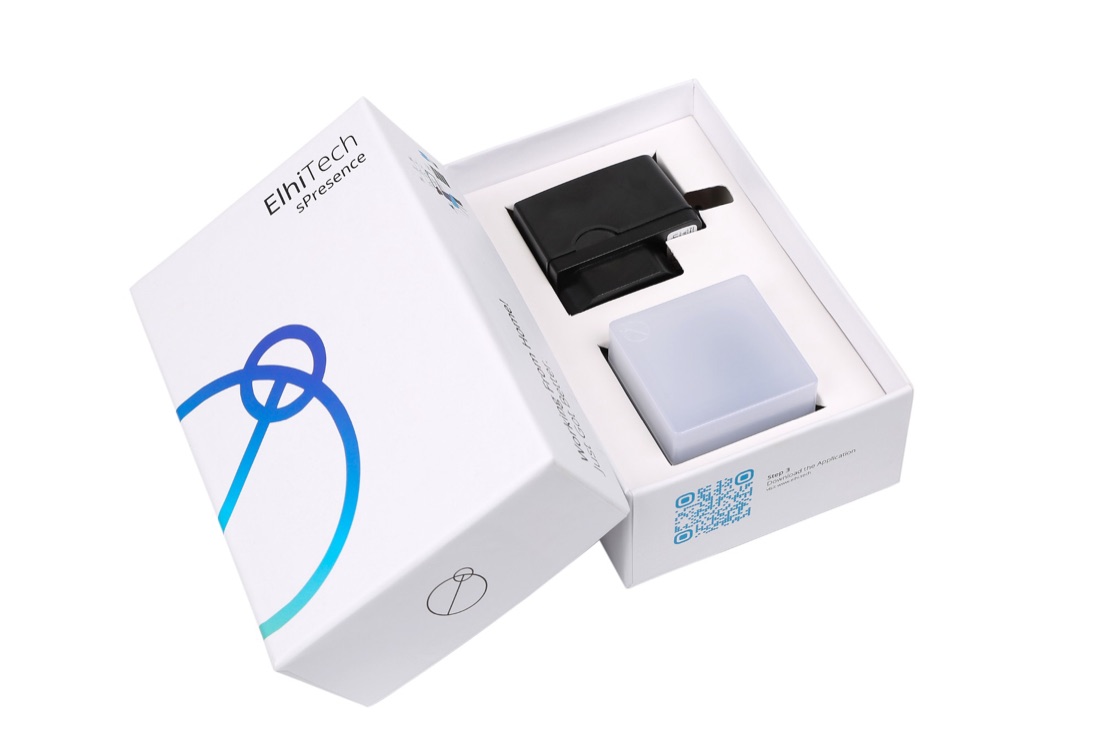
Out of the box and glowing in two minutes.
Plug it in
Any USB charger or laptop port will do.
Get the app
Download it for Mac or Windows.
It starts with your computer and lives by the clock.
Say hello
The app finds your Cubie and puts it on your Wi-Fi.
About two minutes, start to glow.
Questions
Good to know
Which computers does Cubie work with?
Mac (macOS 11 or later) and Windows 10 and 11. The app sits by the clock and starts with your computer.
Does Cubie watch my camera or listen to my calls?
No. It only notices that a call has started and whether your camera is on. Focus mode notes which app is in front, never what you type. The app talks to Cubie over your own Wi-Fi.
Which call apps does it work with?
Any call app on your computer: Zoom, Microsoft Teams, Google Meet, Slack, Webex and the rest. There are no plugins to install.
How does Cubie know what my AI agent is doing?
Switch a tool on in the app and Cubie adds a small hook to that tool’s settings. It hears working, needs you and done for each session, and nothing more: your prompts and code stay where they are. Switch it off and the hook is removed. Some tools, like Cursor and Windsurf, only report working and done.
What Wi-Fi does it need?
A 2.4 GHz Wi-Fi network, the same one your computer is on. Most home routers broadcast 2.4 GHz alongside 5 GHz.
Where can I buy Cubie?
On Amazon India.
Download
Get the Cubie app
Free, and it starts with your computer. Install it, plug in Cubie, and you’re glowing in two minutes.
No Cubie yet? Get one on Amazon India →